FM WhatsApp vs Official WhatsApp: A Complete Comparison
Discover the complete comparison between FM WhatsApp and official WhatsApp. Explore features, privacy, customization, pros and cons, safety tips, and which app suits your needs best.

When it comes to chatting apps, WhatsApp is the first name that comes to mind. But alongside the official version, many users are curious about FM WhatsApp, a modified alternative that promises extra features. This curiosity often sparks a big question: should you stick to the official WhatsApp or try FM WhatsApp?
If you’ve ever felt limited by WhatsApp’s restrictions, you’re not alone. Millions of users search for more control over privacy, themes, and customization. At the same time, many worry about security risks and reliability. This article brings you a balanced, clear, and trustworthy comparison, so you can make an informed choice without confusion.
Here, we’ll explore FM WhatsApp vs Official WhatsApp by comparing features, security, updates, and overall user experience. You’ll find the pros and cons of each, along with expert insights on safety and usability. Whether you value advanced customization or long-term reliability, this guide will help you decide which app better fits your needs.
What is FM WhatsApp?
FM WhatsApp is a modified version of the official WhatsApp app, created by third-party developers to offer extra features that are not available in the original. Unlike the standard app, FM WhatsApp focuses on customization, privacy tweaks, and control over how you interact with your contacts. While it looks similar to WhatsApp in design, the main difference lies in its added tools and flexibility, which attract users looking for something beyond the basics.
Key Features of FM WhatsApp
FM WhatsApp comes packed with features such as advanced privacy settings, the ability to hide online status, send larger media files, and apply unique themes. It also allows users to run multiple accounts on the same device, something the official app doesn’t support. Many also enjoy the option to customize fonts, colors, and icons, making the app more personal and versatile compared to the standard version.
Why People Use It
People choose FM WhatsApp because it gives them more control and freedom. For example, some like the extended privacy options such as hiding “typing” or “recording” indicators, while others prefer the wide range of themes and design choices. Power users often turn to FM WhatsApp for its ability to share large videos, images, and documents without compression. Simply put, it’s popular among those who want an enhanced version of WhatsApp that feels more flexible and customizable.
What is Official WhatsApp?
Official WhatsApp is the original messaging app owned by Meta, trusted by billions of users worldwide. It is known for its simplicity, reliability, and strong focus on security through end-to-end encryption. The app allows people to connect instantly through text, voice, video calls, and media sharing, making it one of the most widely used communication platforms across the globe.
Core Features of the Official App
The official app includes secure messaging, voice and video calling, group chats, and status updates. Its strength lies in fast updates, regular bug fixes, and a strong security system that protects user data. WhatsApp also integrates with features like WhatsApp Web, payments in some regions, and reliable cloud backups, making it convenient and consistent for everyday communication.
Why It Remains the Standard Choice
WhatsApp stays the standard choice because it is safe, legal, and officially supported across all devices. Users don’t have to worry about malware, bans, or privacy risks that often come with third-party apps. With continuous improvements, a familiar design, and the assurance of being backed by a trusted company, the official version is the go-to app for both casual users and businesses.
FM WhatsApp vs Official WhatsApp: Key Differences
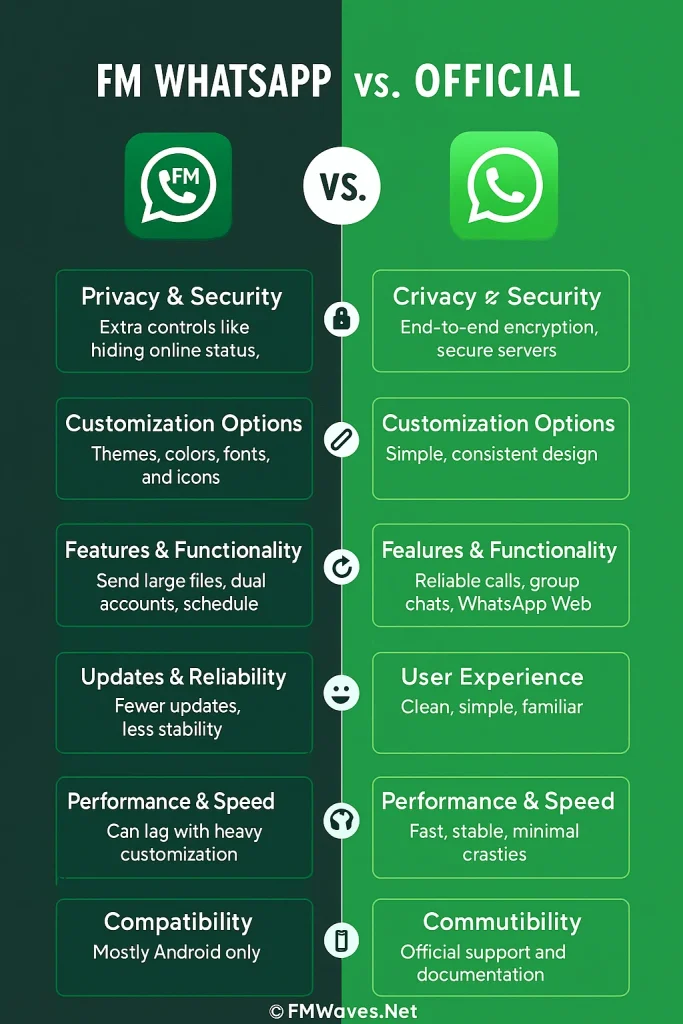
Privacy and Security
When comparing FM WhatsApp and the official WhatsApp, privacy is one of the biggest talking points. FM WhatsApp gives users extra control, such as hiding online status, disabling blue ticks, or removing the typing indicator. These features appeal to those who value discretion in their chats. On the other hand, the official WhatsApp focuses on strong end-to-end encryption and secure servers, which ensures that your conversations remain protected. Both apps have strengths, but their approach to privacy is very different.
Customization Options
FM WhatsApp shines when it comes to customization. Users enjoy the ability to change themes, colors, fonts, and even icons, giving the app a fresh and personal feel. This makes chatting more exciting and less repetitive. The official WhatsApp, however, keeps things simple with its default design. While this may seem limiting, it also means consistency and ease of use across devices, which many people appreciate for its professional and straightforward layout.
Features and Functionality
In terms of functionality, FM WhatsApp offers unique extras like sending large media files, using dual accounts, and scheduling messages. These features make it appealing to power users who want more control over their chats. The official WhatsApp, meanwhile, delivers smooth performance with reliable voice calls, video calls, group chats, and WhatsApp Web. It may not have as many flashy options, but its stability and simplicity are what keep billions of people using it daily without issues.
Updates and Reliability
The biggest difference between the two apps is reliability. Official WhatsApp receives frequent updates, bug fixes, and improvements directly from Meta, ensuring security and long-term stability. FM WhatsApp, being a third-party app, depends on independent developers, which means updates are less frequent and sometimes delayed. While FM WhatsApp users enjoy experimental features early on, the lack of official support can make it risky if problems occur or security patches are missed.
User Experience
Using FM WhatsApp feels refreshing for those who love personalization and advanced tools. It can make chatting more fun with features like theme libraries, hidden chat options, and larger file sharing. However, the official WhatsApp focuses on simplicity and ease, which appeals to people who want a clean and consistent experience. Both apps have their own charm: FM WhatsApp for customization lovers and the official app for those who value stability and familiarity.
Performance and Speed
Performance often becomes a deciding factor between FM WhatsApp and the official version. FM WhatsApp sometimes struggles with smoothness when many customization settings or themes are applied, but it still impresses with its additional tools. Official WhatsApp, backed by Meta’s infrastructure, offers faster loading times, stable calls, and minimal crashes. For users who care about consistent speed without interruptions, the official app stands out as the more dependable choice.
Compatibility Across Devices
When it comes to compatibility, official WhatsApp works seamlessly across Android, iOS, and desktop via WhatsApp Web. It is optimized for almost every device, offering a unified experience. FM WhatsApp is designed mainly for Android users and doesn’t have official cross-platform support. While Android users enjoy extra options, those who need a smooth connection between their phone and computer often prefer the official app, which is designed for universal use.
Community and Support
Support is another area where the difference is clear. Official WhatsApp provides help through FAQs, official documentation, and direct reporting options within the app. FM WhatsApp, being unofficial, does not offer formal customer support, and users rely on online communities for guidance. This community-driven help can be useful, but it lacks the reliability of official assistance. For anyone who values dependable support, the original WhatsApp remains the stronger option.
Pros and Cons of FM WhatsApp
Advantages
- Extra privacy features such as hiding online status, blue ticks, and typing indicators
- Ability to send larger media files without compression
- Multiple account support on the same device
- Wide range of customization options with themes, fonts, and colors
- Option to schedule messages and auto-reply, useful for busy users
Disadvantages
- Lacks official support and may pose security risks
- Updates are less frequent and not as reliable as the official app
- Possibility of getting banned by WhatsApp for using unofficial versions
- Not available on official app stores like Google Play or App Store
- Performance may slow down when too many customizations are applied
Pros and Cons of Official WhatsApp
Advantages
- Strong end-to-end encryption ensures secure communication
- Regular updates with bug fixes and new features from Meta
- Smooth performance and reliability across Android, iOS, and desktop
- Official support with customer service and in-app reporting
- Legal and trusted app available on all major app stores
Limitations
- Limited customization options with no themes or design changes
- File size restrictions on media sharing
- Only one account allowed per device without third-party tools
- Fewer advanced tools compared to modified apps like FM WhatsApp
- Some features roll out slowly depending on the region
Is FM WhatsApp Safe to Use?
FM WhatsApp may look attractive because of its extra privacy settings and customization options, but its safety is a concern. Since it is not an official app, it does not come with the same end-to-end security updates or protection that the original WhatsApp offers. Downloading it from third-party sources can also expose users to malware or data risks. For those who prioritize security and reliability, the official WhatsApp remains the safer and more trustworthy choice.
Conclusion
FM WhatsApp and the official WhatsApp both come with their own strengths and weaknesses. The modified app stands out with advanced privacy controls, customization, and larger file-sharing options, while the official version is trusted for its end-to-end encryption, frequent updates, and reliable support. This comparison has shown how each caters to different user needs, from flexibility to security.
Neither option is perfect, and the right choice depends on what you value most. If you enjoy experimenting with new features and customization, FM WhatsApp may feel exciting. But if long-term safety, stability, and official support matter more, sticking with the original WhatsApp is the smarter path. Both serve the purpose of connecting people, but in very different ways.
If you are still unsure which one to pick, don’t hesitate to share your thoughts in the comments or ask questions. Your feedback helps others make better choices too. And if you need assistance, the official WhatsApp support team is always available to guide you with trustworthy help.